This is the second post in our Feature Spotlight series, where we break down TalentPrism features that staffing teams use every day. Each post covers what the feature does, how it works, and why it matters for your business.
The Problem: Every Conversation Starts From Zero
Most staffing systems treat each candidate interaction as a standalone event. A candidate calls in, shares their location preference and target rate, then calls back a week later — and has to repeat everything. The context is gone.
TalentPrism works differently. Every conversation builds a persistent, structured candidate profile that recruiters and AI agents can reference instantly. No repeated questions. No lost context. No cold starts.
🧠 What This Feature Does
TalentPrism uses a two-layer design to capture and retain candidate context across every interaction.
Layer 1: Engagement Events (What Happened)
Each interaction is classified into a structured event record — an immutable log of what occurred. These events capture:
| Field | Example Values |
|---|---|
| Engagement Intent | Interested now, future interest, inquiry only |
| Lead Temperature | Hot, Warm, Cold, Disqualified |
| Next Best Action | Apply flow, answer question, subscribe alerts, recruiter follow-up |
| Reason Category | Prefers job alerts, timing not right now, location mismatch |
| Recruiter Follow-Up Needed | Yes / No |
| Contact & Compliance | Recipient status, do-not-contact flag |
This gives your team a complete, queryable history of every candidate touchpoint — not just “they called.”
Layer 2: Candidate Memory (Current Snapshot)
On top of the event log, TalentPrism maintains a living candidate profile — a structured snapshot that’s always up to date:
| Memory Field | Example Values |
|---|---|
| Availability | Actively looking, passively open, not looking, unknown |
| Contactability | Active, inactive, unknown + do-not-contact flag |
| Location Preference | Dallas area, Remote only, Open to relocation |
| Rate Preference | Around $22/hour, $60K+ annually |
This memory is what recruiters and AI agents use for continuity across interactions — whether it’s a follow-up call, a job alert, or a recruiter handoff.
💬 How It Works: A Real Conversation → Memory Journey
Here’s how a real candidate interaction flows through the system:
Candidate 4694 — Chat Conversation:
- Candidate expresses job interest during the conversation
- Shares target location: Dallas area
- Shares target rate: around $22/hour
- Asks to receive job alerts for future roles
What TalentPrism Saves:
| Field | Value |
|---|---|
| Recipient Status | Active |
| Availability | Actively looking |
| Location Preference | Dallas area |
| Rate Preference | Around $22/hour |
The key insight: The system doesn’t just respond in the moment — it builds a recruiter-ready memory profile from the conversation. When this candidate reaches out again (or a recruiter follows up), all the context is already there.
📊 The Engagement Taxonomy in Action
Every interaction gets classified, not just stored. Here’s what the taxonomy captures across different candidate scenarios:
| Scenario | Intent | Lead Temp | Next Action | Memory Update |
|---|---|---|---|---|
| Candidate interested, shares details | Interested now | Hot | Apply flow | Location + rate saved |
| Candidate curious but timing is off | Future interest | Warm | Subscribe alerts | Availability → passively open |
| Candidate asks a general question | Inquiry only | Cold | Answer question | Contactability confirmed |
| Candidate requests no further contact | — | Disqualified | None | do_not_contact → true |
These aren’t arbitrary labels — they’re actionable classifications that drive what happens next, automatically.
📈 Client Snapshot: Jan–Feb 2026
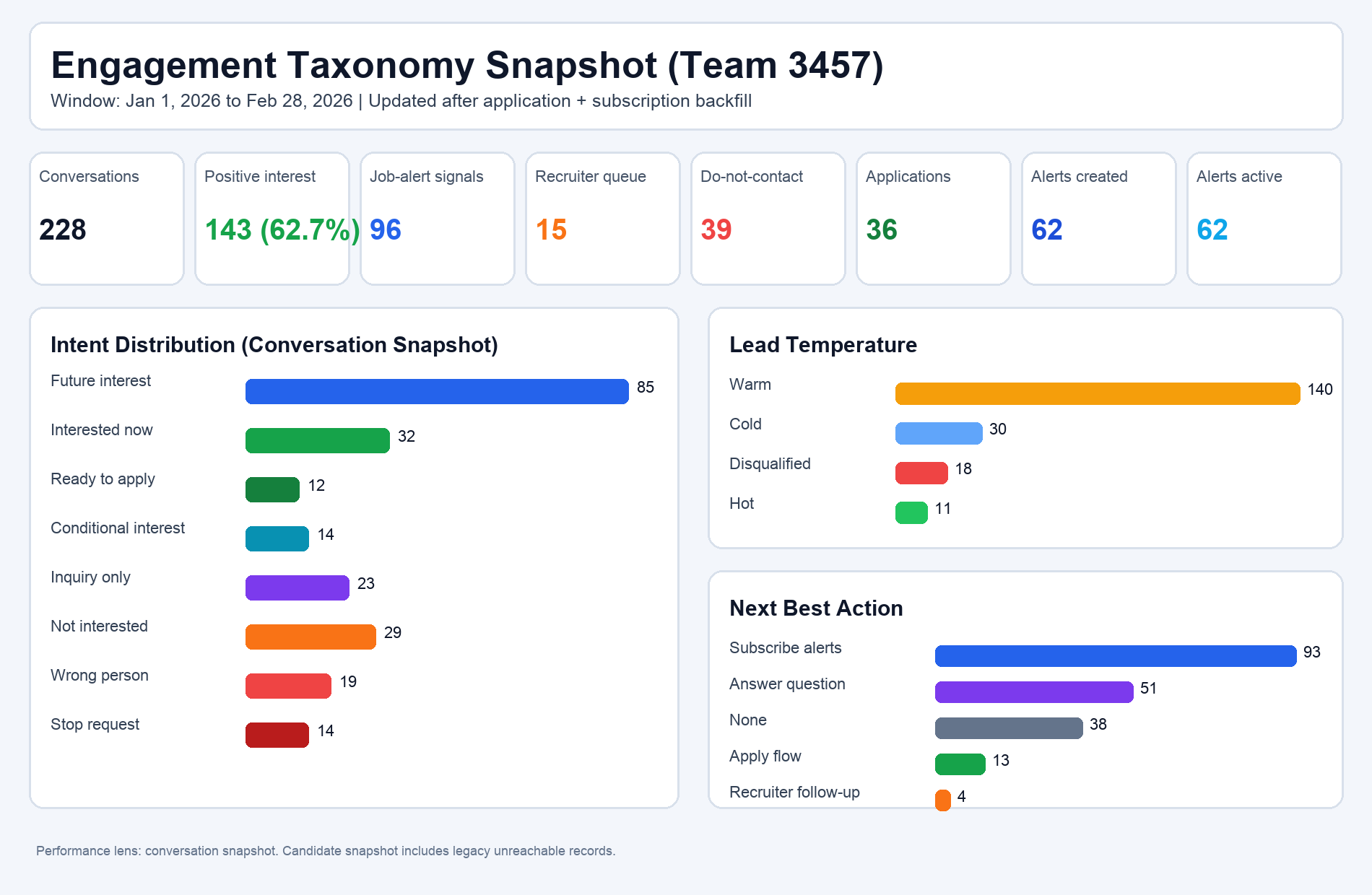
From the Jan 1, 2026 to Feb 28, 2026 client snapshot after application + subscription backfill:
| Metric | Value |
|---|---|
| Conversations | 228 |
| Positive interest | 143 (62.7%) |
| Job-alert signals | 96 |
| Recruiter queue | 15 |
| Do-not-contact | 39 |
| Applications | 36 |
| Alerts created | 62 |
| Alerts active | 62 |
Intent distribution in that same window:
| Intent | Count |
|---|---|
| Future interest | 85 |
| Interested now | 32 |
| Ready to apply | 12 |
| Conditional interest | 14 |
| Inquiry only | 23 |
| Not interested | 29 |
| Wrong person | 19 |
| Stop request | 14 |
Lead temperature:
| Temperature | Count |
|---|---|
| Warm | 140 |
| Cold | 30 |
| Disqualified | 18 |
| Hot | 11 |
Next best action:
| Action | Count |
|---|---|
| Subscribe alerts | 93 |
| Answer question | 51 |
| None | 38 |
| Apply flow | 13 |
| Recruiter follow-up | 4 |
This is the key operational point: the system isn’t forcing one outcome. It’s classifying real-world candidate states and routing the right next action at scale.
🔄 Memory Supports Every Candidate State
TalentPrism’s memory system handles the full range of candidate situations:
- Actively looking — candidate is ready, route to open roles and recruiters
- Passively open — candidate is interested but not urgent, keep them warm with alerts
- Not looking right now — respect the timing, check back later
- Do not contact — compliance flag persisted across all channels, no accidental outreach
These are all valid states in a high-quality system. The goal is reliable memory continuity, not forcing every candidate into one path.
What This Means for Your Business
| Before (No Memory) | After (Candidate Memory) |
|---|---|
| Every call starts with “What are you looking for?” | Context is already loaded — jump straight to matching |
| Recruiter handoffs lose candidate details | Full profile with preferences, history, and intent |
| No way to track lead quality over time | Engagement taxonomy shows warming/cooling trends |
| Opt-out requests can slip through the cracks | Compliance flags persisted and enforced automatically |
The bottom line:
- Better recruiter handoffs — every handoff includes full context, not just a name
- Less repeated questioning — candidates feel remembered, not interrogated
- Stronger lead quality over time — engagement history shows who’s warming up
- Safer outreach compliance — opt-out preferences are never lost
👀 See It in Practice
Here’s what this looks like inside TalentPrism:
Conversation → Memory Flow: The system collects key details (role, location, rate) during natural conversation, then saves them as structured candidate memory — active status, availability, location preference, and rate — all queryable and reusable.
Conditional Intent: Candidate memory supports nuanced states like “passively open” — not just binary interested/not interested.
Compliance Signals: When a candidate opts out, the do-not-contact flag is persisted immediately and respected across all future interactions.
Candidate Memory Card Example
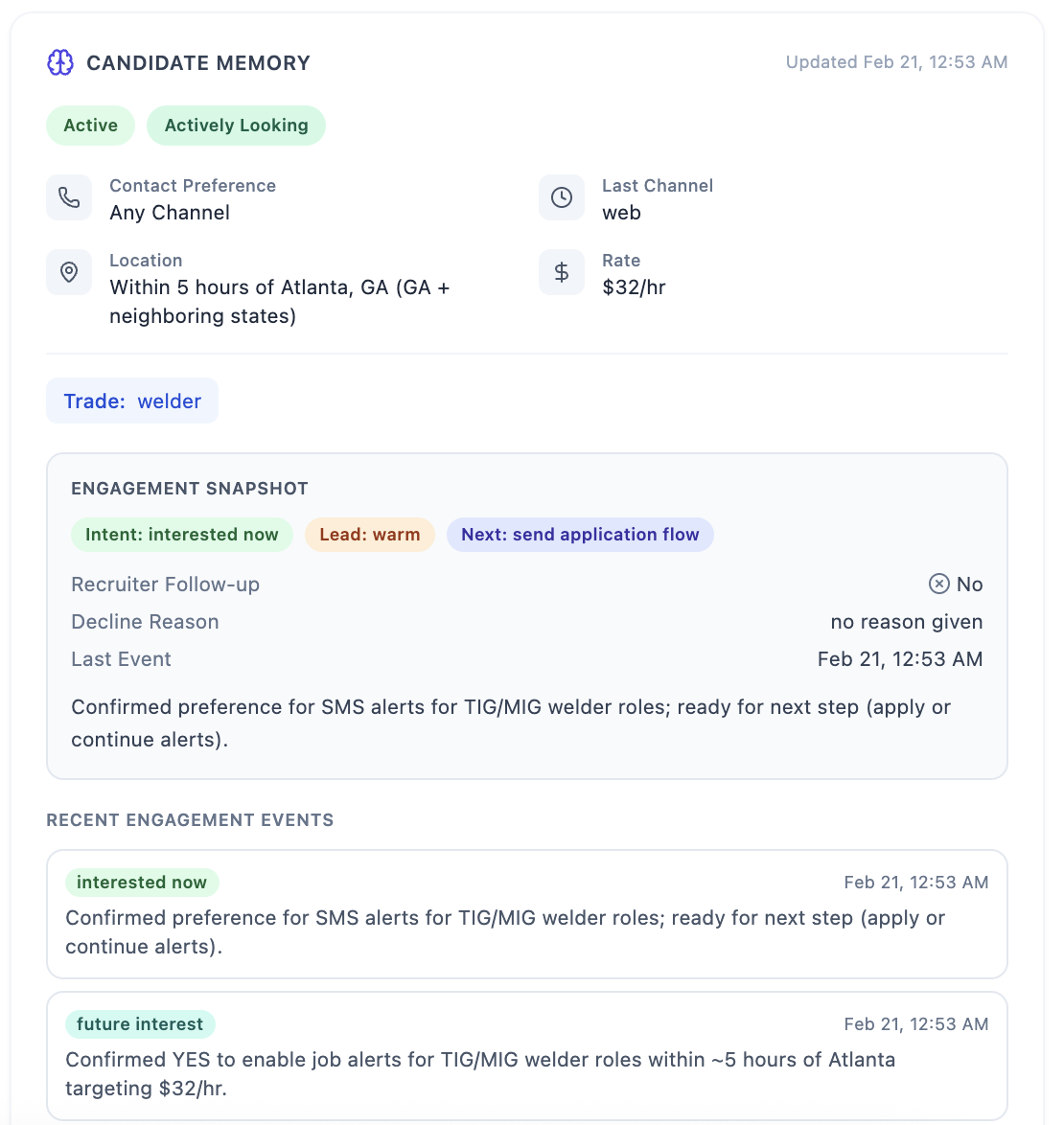
A recent memory card example shows exactly how this becomes recruiter-ready context in one view:
- Candidate status: Active
- Availability: Actively looking
- Trade: Welder
- Location preference: within 5 hours of Atlanta, GA
- Rate target: $32/hr
- Last channel: web
- Engagement snapshot: intent = interested now, lead = warm, next action = send application flow
- Recruiter follow-up required: No
Recent events also preserve sequencing, not just the latest state. Example progression:
- Future-interest signal with alert preference
- Interested-now confirmation for TIG/MIG alerts
- Next step marked for application flow
This is why recruiter handoffs are faster: event history + current memory are visible together.
Chat → Event Tags → Candidate Memory
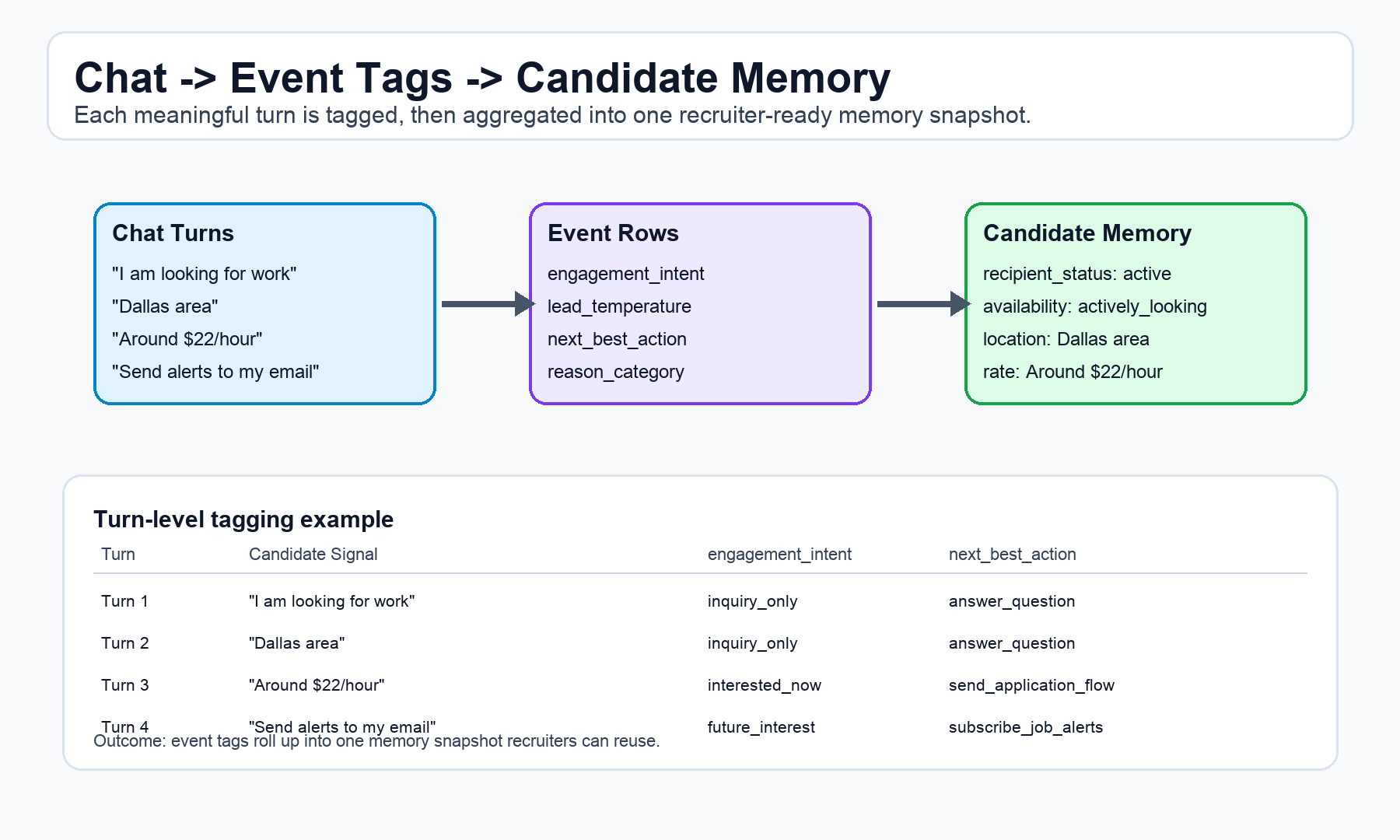
The processing model is simple and consistent:
- Candidate sends meaningful chat turns
- Each turn is tagged as an engagement event row (
engagement_intent,lead_temperature,next_best_action,reason_category) - Tags roll up into one memory snapshot recruiters can act on immediately
Turn-level example:
| Turn | Candidate Signal | engagement_intent | next_best_action |
|---|---|---|---|
| 1 | “I am looking for work” | inquiry_only | answer_question |
| 2 | “Dallas area” | inquiry_only | answer_question |
| 3 | “Around $22/hour” | interested_now | send_application_flow |
| 4 | “Send alerts to my email” | future_interest | subscribe_job_alerts |
Outcome: one reusable profile with active status, availability, location preference, rate preference, and alert context.
Get Started
Candidate Memory and Engagement Taxonomy are built into TalentPrism’s conversation platform. Every interaction your system handles automatically feeds into structured memory — no extra setup required.
Want to see how your candidate data would look with structured memory? Reach out to us:
Have questions about how Candidate Memory works with your existing workflows? We’d love to walk you through it.
This post is part of the Feature Spotlight series. Follow along as we cover more TalentPrism features that help staffing teams work smarter.