This post is part of our Feature Spotlight series, where we break down TalentPrism features that staffing teams use every day: what the feature does, how it works, and why it matters for your business.
Most recruiting tools put everything inside the job. Want to text candidates? Open a job. Answer an inbound call? It needs a job. Reach out to people who went quiet six months ago? Invent a job to hang it on.
That’s not how a staffing desk works. One outreach push often covers a dozen open reqs. The phone rings whether or not there’s a matching job. And the people who answer are the same people every day.
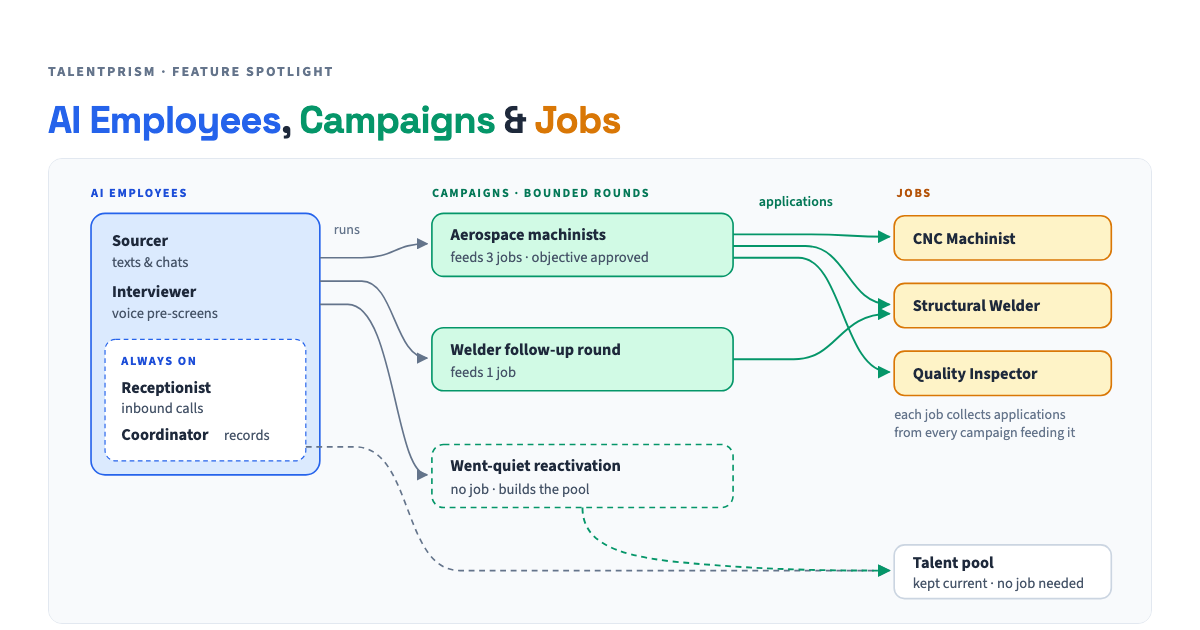
So TalentPrism is built around three things, with one clear line between them.
- Sourcer texts and chats with candidates
- Receptionist answers your inbound line
- Interviewer runs voice pre-screens
- Coordinator keeps records fresh
- Copilot works for your recruiters
- An audience and your rules
- An approved objective, tested before launch
- Feeds zero, one or many jobs
- Reports sent, replied, qualified, cost
- Requirements, rate, status
- Applications from every campaign
- Voice interviews and transcripts
- Submittals and hires
The AI employees: your team that never logs off
An AI employee is a teammate, not a setting. You set up the Sourcer once — its name, how it sounds, what it will and won’t say — and it works every campaign and every job you point it at. You don’t build a new bot per req.
Some of their work has no start or end date. The Receptionist answers the phone whenever it rings. The Coordinator quietly keeps candidate records current between pushes: who’s available, who moved, who picked up a new certification. None of that needs a job or a campaign, so in TalentPrism it doesn’t have one.
The Copilot is the odd one out: it works for your recruiters, not for candidates. It briefs them in the morning and sets up campaigns from a plain-English request, and a recruiter approves every step.
Campaigns: one round, many jobs
A campaign is one bounded round of outreach: who you’re reaching, what you’re asking, and the rules the AI follows, such as rate floors, required certs, and who to leave alone. You approve the objective, the AI is tested against it, and only then does it launch.
The key difference from job-bound tools: a campaign can feed many jobs, or none.
- “Reach every machinist within 50 miles about our 12 open CNC reqs” is one campaign feeding 12 jobs.
- “Re-engage welders who went quiet this spring” is a campaign with no job at all. It builds your pool.
Campaigns are where you see outreach numbers: messages sent, replies, qualified leads and cost per lead.
Jobs: where the outcomes add up
A job is the requisition. You set it up once, and after that it’s where results collect: every application, from every campaign that fed it, plus interviews, transcripts, submittals and hires.
The job page doesn’t repeat campaign stats. It answers the question the client is asking: who’s in the pipeline for this req, and where are they?
The line between them: the application
Here’s the rule that keeps it all clean. Everything before an application belongs to the campaign. Everything after it belongs to the job.
When a candidate from a campaign fits a req and applies, TalentPrism creates an application that belongs to exactly one job and records the campaign it came from. “Talked to us through campaign X” and “applied to job Y” are two separate facts. We never assume the second from the first.
That one rule is what lets you answer the question every owner eventually asks: which outreach actually produced placements? Not which one got the most replies. Which one got people submitted.
Four stories, told with the three pieces
- CampaignSaturday, 9:04 p.m. A machinist replies to this week's round
- AI EmployeeThe Sourcer answers in seconds. No queue, no voicemail
- CampaignScreens against your rules: rate, certs, shift, availability
- CampaignFits the CNC req: application created, campaign recorded
- Recruiter8 a.m.: reviews the facts, not a cold profile
- JobVoice interview runs; transcript lands on the application
- RecruiterSubmits to the client. The job counts it
- Recruiter"Reach machinists within 50 miles about our 12 CNC reqs"
- AI EmployeeThe Copilot drafts the audience and objective, and asks the one question that matters
- CampaignObjective tested against practice conversations
- RecruiterReviews, tweaks, approves
- CampaignLaunches: one round, every step under the same approved rules
- Jobs ×12Applications land on whichever reqs candidates actually fit
- CallerA pipefitter calls your line on their lunch break
- AI EmployeeThe Receptionist answers: who, trade, availability, what they want
- AI EmployeeUpdates their record. New callers join your pool
- RecruiterGets the message, with the details already captured
- AI EmployeeThe Coordinator keeps welder records current for months. No job, no campaign
- JobA new req arrives: 6 structural welders
- Recruiter"Run a round with the welders who went quiet"
- CampaignWarm audience × new job. Approved, then launched
- JobApplications land on the welder req, each crediting the round
Why it matters for your desk
- Set up once, reuse everywhere. Your AI employees keep their voice, name and guardrails across every campaign and job. No rebuilding per req.
- Outreach matches how you actually recruit. One push can cover a dozen reqs, or build your pool with no req at all.
- Nothing falls through because it lacked a job. Inbound calls and keep-in-touch work have a home.
- Honest numbers. Campaigns show what outreach cost and who it reached. Jobs show who got submitted. Because each application records where it came from, you can tell which rounds actually produced submittals.
- Your recruiters still decide. The AI does the reaching, answering, screening and record-keeping. Recruiters approve campaigns and choose who moves forward.
Related: Feature Spotlight: AI Voice Interviews · Case Study: One Week, 1,187 Machinists, and 7 of 13 Client Submissions.
Want to see your AI employees run a campaign across your open reqs? Book a demo.
This post is part of the Feature Spotlight series. Follow along as we cover more TalentPrism features that help staffing teams work smarter.